

True cost-effective SEO isn't about finding the cheapest shortcuts. It’s about squeezing the most value out of every hour and every dollar you put in. The real goal is to build a digital asset that brings in leads and sales on autopilot, not just a temporary bump from a paid campaign that disappears when you stop paying.
Building Your Foundation for Cost-Effective SEO

The first step is a simple mindset shift. Stop thinking of SEO as a monthly marketing expense and start treating it as an investment in your company's digital equity.
This is critical because SEO's value compounds over time. Paid ads are like renting—the traffic stops the moment you turn off the spend. SEO is like buying a property that appreciates. Research backs this up, showing that SEO can generate nearly 5x more return on ad spend than paid search, and often at a fraction of the cost. The numbers are even clearer for lead generation, where an SEO lead costs 61% less than one from outbound marketing.
The High-Impact, Low-Effort Framework
To get this right on a budget, you have to be ruthless with prioritization. Forget about chasing every minor algorithm update or splurging on complex, expensive tools right out of the gate. The key is to funnel your limited resources into tasks that deliver the biggest bang for your buck.
This is the 'High-Impact, Low-Effort' framework that should guide every decision you make. Before you can apply it, you need a clear picture of where your website stands today. We'll start with a simple self-audit checklist that zeroes in on the things that actually drive growth:
- Technical Health: Can search engines even crawl and understand your site properly? Things like slow page speed or a handful of broken links can silently sabotage your rankings.
- On-Page Elements: Do your page titles, headers, and content actually match what your customers are searching for? You'd be surprised how much of a difference small tweaks here can make.
- Local Visibility: If you're a local business, is your Google Business Profile fully optimized? This is often the single most powerful free marketing tool you have.
Nailing these fundamentals sets the stage for sustainable growth. A solid foundation ensures that everything else you do—from writing a blog post to earning a backlink—delivers the maximum possible return.
To give you a clearer idea of how to prioritize, I've put together a table comparing common SEO tasks. It helps visualize what's worth your time now versus what can wait.
High-Impact vs. Low-Impact SEO Activities
| SEO Activity | Potential ROI Impact | Typical Resource Cost (Time/Money) | Best For |
|---|---|---|---|
| Optimizing Google Business Profile | High | Low (Time-intensive setup, low upkeep) | Local businesses, service area businesses. |
| Keyword Research for "Money Pages" | High | Medium (Requires tools and analysis) | Businesses ready to align content with buyer intent. |
| Fixing Critical Technical Errors | High | Medium (Can be quick or require a developer) | Any website with crawling, indexing, or speed issues. |
| Creating In-Depth Blog Content | Medium-High | High (Significant time for research and writing) | Building authority and capturing top-of-funnel traffic. |
| Chasing Every Algorithm Update | Low | Medium (Can be a time sink with little return) | No one. Focus on fundamentals, not speculation. |
| Manual, Large-Scale Link Building | High | Very High (Expensive and time-consuming) | Established businesses with a large budget. |
| Updating Social Media Profiles | Low | Low | Brand consistency, but not a direct SEO driver. |
This table isn't exhaustive, but it illustrates the thought process. You want to live in that top-left quadrant as much as possible, especially when you're just starting out.
This foundational knowledge is what makes the rest of this guide work. Before moving on, it’s really important to have a firm grasp of the core concepts. If you're new to this, you might want to check out our deep dive into the basics of SEO and its importance for business websites. That understanding will empower you to make smarter, more profitable decisions without needing a massive marketing budget.
Conducting Your Own Technical and On-Page Audit
Technical SEO sounds intimidating, I get it. But you absolutely do not need to be a developer to spot and fix the most common issues holding your website back. A huge part of cost-effective SEO is simply focusing your energy on high-impact fixes, and you can find plenty of those with free tools and a little guidance.
Your goal here isn't to become a tech wizard overnight. Think of yourself as a detective, looking for clues that hurt the user experience and tell search engines your site isn’t quite up to scratch. And the best part? Your most powerful tool is completely free.
Start with Google Search Console
Google Search Console (GSC) is non-negotiable for any website owner. It's Google’s direct line of communication, telling you exactly how it sees your site. If you haven't set it up, stop reading and do that now—it’s the single most valuable free resource you have.
Once you’re in, don't get overwhelmed. Just zero in on these three critical areas first:
- Coverage Report: This shows you which pages Google has indexed and, more importantly, which ones it hasn't (and why). Keep an eye out for "Errors" like server errors (5xx) or "Not Found" (404) pages. Fixing these is a quick win that ensures Google can actually access your valuable content.
- Page Experience Report: Here you’ll find vital metrics like mobile usability and Core Web Vitals. Google will flag pages that aren't mobile-friendly, which is a massive ranking issue since most searches happen on phones.
- Sitemaps: Submitting a sitemap tells Google about all the pages you consider important. Check here to make sure your sitemap has been processed correctly and isn’t riddled with errors.
Tackling the "Errors" listed in your Coverage report is one of the fastest technical wins you can get. A high number of 404 errors can signal a low-quality site to Google, so addressing those broken links is a crucial and straightforward first step.
Audit Your Site Speed and Mobile Friendliness
Site speed isn't just a technical metric; it's a user experience and conversion metric. Slow pages make people leave. That means lost sales and poor engagement signals sent straight to the search engines. In fact, studies show that even a one-second delay in page load time can cause a 7% reduction in conversions.
You can use Google's own PageSpeed Insights tool for a free, detailed analysis. It gives you a performance score for both mobile and desktop and offers specific, actionable recommendations for improvement, like compressing images or cutting down server response times.
Simple Speed Wins Checklist:
- Image Compression: This is often the biggest and easiest speed improvement you can make. Use a tool like Compressor.io to shrink image file sizes without sacrificing quality.
- Check Mobile Usability: Run your site through Google’s Mobile-Friendly Test. If it fails, this becomes your top priority. Your design might need tweaks to ensure buttons are tappable and text is readable on a small screen.
- Minimize Plugins: If you're on WordPress, deactivate and delete any plugins you aren't actively using. Each one adds code that can slow your site down.
Optimize Your On-Page Elements
Once your technical foundation is solid, you can shift your focus to the on-page elements. This is all about communicating your content's relevance to both users and search engines, and it's where you can make some immediate gains—especially for your most important "money pages" like your product, service, or contact pages.
Think about a local plumber. A generic page title like "Services" is a totally missed opportunity. A much better, optimized title would be "Emergency Plumbing Services in [City] | [Company Name]." It instantly tells Google and potential customers what the page is about and where the service is offered.
Or, an ecommerce store selling handmade leather bags could change a product page title from "The Classic Tote" to "Handmade Italian Leather Tote Bag | Free Shipping." This targets high-intent search terms and highlights a key selling point. It’s a simple change that transforms a generic page into a magnet for qualified buyers. This is cost-effective SEO in its purest form—small tweaks, big results.
Developing a Budget-Friendly Content Strategy

You don't need a massive content budget to compete. In fact, some of the smartest SEO campaigns I've seen were built on resourceful, clever content—not just churning out endless articles. A truly cost-effective SEO strategy puts value and relevance first.
The secret is to stop thinking like a content factory and start acting like a problem-solver for your ideal customer. It all begins with finding the right keywords. I'm not talking about the vanity keywords with huge search volume, but the ones that show a customer is getting ready to open their wallet.
Uncover Buyer-Intent Keywords for Free
High-traffic keywords are almost always insanely competitive and expensive to rank for. Instead, your time is better spent on keywords that signal "buyer intent." These are the specific, often longer phrases people type in when they're close to making a decision.
And you don't need pricey tools to find them. Google's own search results page is a goldmine. Just type in a broad term related to your service and scroll down. The "People also ask" and "Related searches" sections are giving you a direct look into the minds of your customers.
A few free tools can get you started:
- Google Keyword Planner: It's built for ads, but it's a fantastic free resource for brainstorming keyword ideas and getting a rough sense of search volumes.
- AnswerThePublic: This tool is great for visualizing all the questions people are asking around a topic, helping you pinpoint the exact problems you need to solve.
- Google Trends: Use this to see what's popular over time. You can spot emerging trends in your industry before your competitors do.
To build a content plan that doesn't break the bank, solid long tail keyword research is non-negotiable. For example, a local landscaper trying to rank for "landscaping" is in for a long, expensive fight. But targeting "drought-tolerant garden design for small backyards"? That's specific, less competitive, and attracts a much more qualified lead.
Adopt the "Create Once, Distribute Many" Model
One of the most powerful, budget-friendly tactics is repurposing. It’s a simple concept: create one big, foundational piece of "pillar" content, then slice and dice it into dozens of smaller assets for all your different channels. This is how you maximize the return on every minute you spend creating.
Let's say you're a custom home builder and you just wrapped up a big project. That single job can fuel your content marketing for months.
Pillar Piece Example: A Detailed Case Study
Your core asset is an in-depth case study on your website. Make sure it includes:
- The Client's Challenge: What problem were they facing before they found you? Get specific.
- Your Unique Solution: Walk through your process step-by-step. This is where you show off your expertise.
- The Stunning Results: This is the payoff. Use high-quality photos, videos, and a glowing client testimonial.
From this one piece, you can spin off an incredible amount of content.
Don't let your best content die after one post. A single in-depth guide or case study contains enough material for a dozen social media updates, multiple email newsletters, and several short-form videos. This is the essence of working smarter, not harder.
Repurpose Your Pillar Content
Once the case study is live, the real work begins. This is how you squeeze every drop of value from your initial effort.
- Blog Posts: Write a series of posts, each diving into one specific part of the project. One post could be "5 Things to Consider When Choosing Kitchen Countertops," using photos from the case study. Another could be "How We Designed a Sustainable Outdoor Living Space."
- Social Media Updates: Create an Instagram carousel with before-and-after shots. Turn short clips of the construction process into a TikTok or Reel. Post the client testimonial as a standout graphic on LinkedIn.
- Email Newsletters: Announce the new case study to your email list. Share one key tip from the project and link back to the full story on your site.
- Video Content: A short video tour of the finished home is perfect for YouTube. You could even record a quick interview with the project manager explaining a unique feature.
This approach ensures your hard work gets seen by the widest possible audience without you having to constantly come up with brand-new ideas. It's a cornerstone of any truly cost-effective SEO plan.
Dominating Local Search with Google Business Profile
If you run a business with a physical storefront or a specific service area, local SEO isn't just another marketing tactic—it's easily the most powerful and cost-effective SEO strategy you can use. The return on investment is huge because you're reaching people who are right around the corner, actively searching for exactly what you offer.
The undisputed champion here is your Google Business Profile (GBP). This free listing is your digital storefront on Google Search and Maps. Getting it right is the fastest way to get in front of real, local customers. Ignoring it is like having a shop on a busy street but keeping the blinds pulled down.
Your GBP Is More Than Just a Listing
Stop thinking of your GBP as a static business card. It's a dynamic, interactive hub where potential customers find your hours, read reviews, see photos of your work, and even message you directly. A complete, active profile tells Google you’re a legitimate, trustworthy business worth showing to its users.
This is your shot at making a killer first impression before someone even clicks through to your website.
Here's a quick look at the Google Business Profile dashboard—this is command central for your local presence.
This screenshot shows how you can manage everything in one place, from your business info to customer engagement and performance insights.
Optimizing Your Profile for Maximum Impact
Nailing the basics is non-negotiable. This means going way beyond just plugging in your business name and address.
- Complete Every Single Section: Don't get lazy and skip fields. Fill out your service areas, add your hours, list out every service or product you offer, and include accessibility info. The more complete your profile is, the more chances you have to show up in different local searches.
- Write a Compelling Description: Your business description is your elevator pitch. Instead of a dry list of services, tell a quick story. A roofer could say, "For over 15 years, we've protected local families with reliable, high-quality roofing, all backed by a 10-year warranty." See the difference?
- Upload High-Quality Photos and Videos: Show, don't just tell. Post crisp photos of your storefront, your team in action, finished projects, and happy customers. According to Google, businesses with photos get 42% more requests for driving directions and 35% more clicks to their websites.
Your Name, Address, and Phone Number (NAP) have to be perfectly consistent across your GBP, your website, and every other online directory. A tiny variation like "St." versus "Street" can confuse search engines and water down your local authority.
Actively Engage to Build Trust and Relevance
An optimized profile is just the starting point. It's the ongoing engagement that really pushes you to the top of the local results.
Encourage and Respond to Reviews
Reviews are a massive local ranking factor. You need to be actively asking satisfied customers to leave a review—make it easy for them with a direct link. And here’s the crucial part: respond to all of them, good and bad. A thoughtful response to a negative review shows you care and can often win over people who are on the fence.
Use Google Posts and Q&A
Think of Google Posts as mini-ads that show up right on your profile. Use them to announce a sale, highlight a new product, or share company news. The Q&A section is another goldmine. Jump in and answer common questions yourself before a customer does. This lets you control the narrative and provide helpful info right away.
For those of you on WordPress, you can seriously streamline this process by using some of the best local SEO WordPress plugins. And if you're hungry for more tactics to become a local powerhouse, we have a ton of detailed strategies for local business SEO success. Managing your profile actively shows Google you're relevant and gives users real value, locking in your spot in the local market.
Measuring SEO ROI and Planning Your Next Steps
Putting in the work on SEO is only half the job. If you aren't measuring what happens next, you're just guessing—pouring your valuable time and energy into a black box and hoping for the best.
This is exactly where a lot of DIY SEO efforts stumble. It's not because of a lack of action, but a lack of data to show what's actually making a difference.
The good news? You don’t need some eye-wateringly expensive analytics suite to figure this out. For most businesses, the combination of Google Search Console and Google Analytics 4 (GA4) is more than enough to connect your SEO work to what really matters: your bottom line.
Tracking the Metrics That Actually Matter
It's way too easy to get lost in a sea of data. To keep your sanity and stay focused, you need to zero in on the numbers that actually reflect business growth. "Impressions" might look nice on a chart, but they don't pay the bills.
Instead, create a simple dashboard or even just a monthly checklist to monitor these key performance indicators (KPIs):
- Organic Traffic Growth: Is the number of people finding you through search (not ads) going up month over month? This is your most basic health check.
- Keyword Ranking Improvements: Are you climbing the ladder for your most important "buyer intent" keywords? Check the Performance report in Google Search Console to keep an eye on your top 10-20 terms.
- Conversion Rate from Organic Traffic: This is the big one. What percentage of your organic visitors are taking the action you want them to take? This could be filling out a contact form, signing up for your email list, or buying something.
This is why setting up conversion tracking is non-negotiable. In GA4, you can create "Events" that fire when someone completes a key action, like a "generate_lead" event for a form submission. This lets you see exactly which pages and keywords are driving real business.
Don't just track traffic; track what the traffic does. A huge spike in organic visitors means nothing if none of them convert. The goal is to prove that SEO is generating leads and sales, not just clicks.
Calculating Your SEO Return on Investment
Once you're tracking conversions, figuring out your ROI is surprisingly simple.
The basic formula is straightforward: (Value of Conversions – Cost of SEO) / Cost of SEO.
Let’s run through a real-world example. Imagine you’re a local roofing contractor. Your "cost" is the time you spend optimizing your Google Business Profile and writing a couple of blog posts, plus maybe $50/month for a basic SEO tool. Let's say you value your time at $500/month.
If your SEO work brings in five new qualified leads this month, and you typically close one out of every five for an average project value of $8,000, the math breaks down like this:
- Value of Conversions: 1 closed deal × $8,000 = $8,000
- Cost of SEO: $500 (your time) + $50 (tool) = $550
- ROI: ($8,000 – $550) / $550 = 13.5, which is a 1,350% return.
Suddenly, SEO isn't just a vague "marketing task"—it's a clear profit center. If you want to get more granular, our guide on how to calculate your conversion cost is a great resource. It's a critical skill for any business owner.
This decision tree can help you visualize which local SEO tactics to focus on first, depending on your business model.
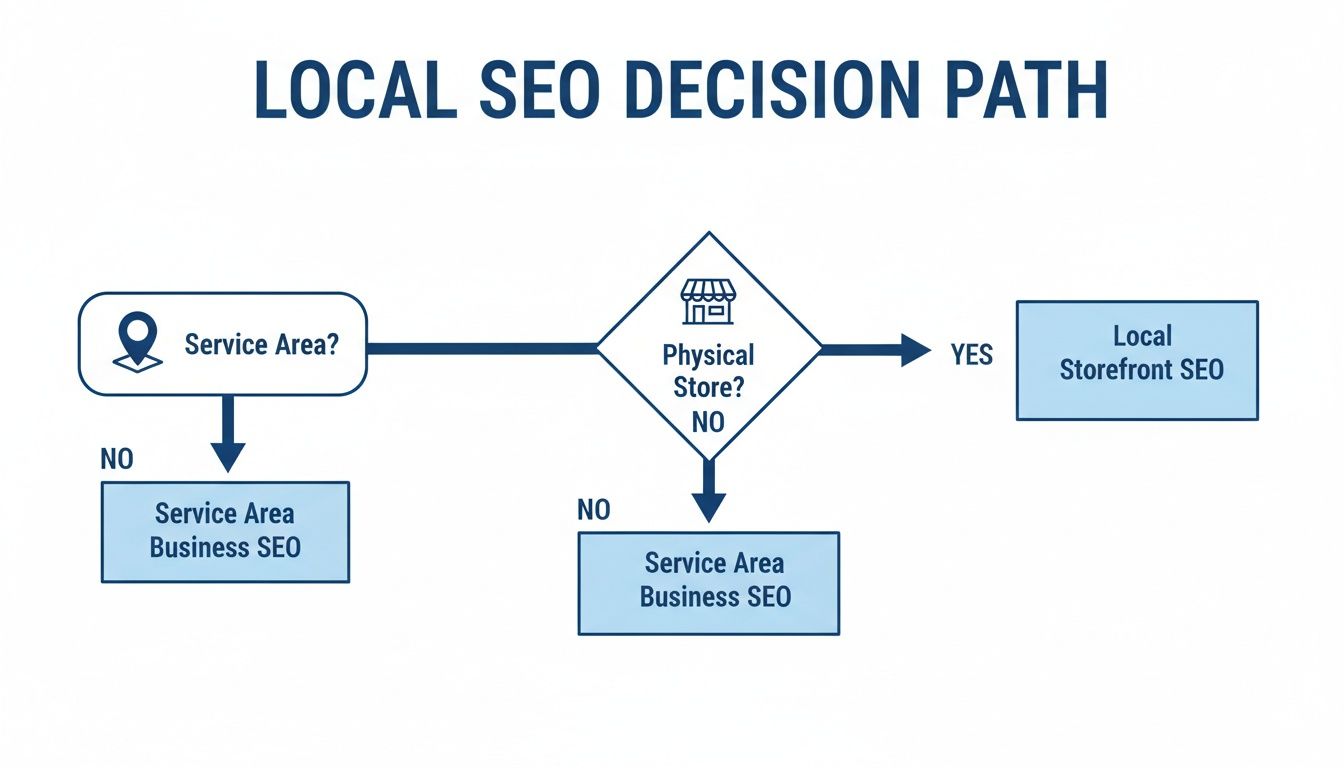
The main takeaway here is pretty clear: whether you have a physical storefront or a service-area business, a fully optimized Google Business Profile is the bedrock you build everything else on.
Knowing When to Scale or Hire Help
So, how do you know when it’s time to level up? Your ROI data is your guide.
If you’re seeing a positive return but feel like you've hit a ceiling—or you're simply out of hours in the day—it's time to think about your next move. You're typically looking at one of three paths: keep doing it yourself, hire a freelancer, or bring on an agency.
Don't forget to factor in the true cost of DIY SEO. Between tools ($100-$500/month) and the opportunity cost of your time (10-20 hours/month), you could easily be looking at an investment equivalent to $1,500-$3,000+ per month. For many small businesses, a dedicated investment of $1,000-$3,000 per month can deliver serious results, especially for local SEO.
To help you decide what’s right for you, here’s a simple framework based on where your business is today.
SEO Scaling Decision Matrix
This table breaks down the common paths businesses take as they grow, helping you align your SEO investment with your revenue and goals.
| Growth Stage | Typical Monthly Revenue | Recommended SEO Approach | Key Considerations |
|---|---|---|---|
| Early Stage / Startup | Under $10k | DIY / Freelancer | Focus on foundational, high-impact tasks. Your time is your biggest investment right now. |
| Growth Phase | $10k – $50k | Specialist Freelancer / Small Agency | You need consistent execution and expertise that goes beyond the basics. Your time is better spent on core operations. |
| Scaling Business | Over $50k | Specialized Agency | You require a comprehensive strategy, advanced analytics, and a full team to drive aggressive growth. |
Ultimately, choosing the right path depends entirely on your resources, your goals, and how tough your market is. By starting with a data-driven, ROI-focused approach, you’ll know exactly when your cost-effective SEO strategy is ready for the next level.
Your Top Questions About Budget SEO, Answered
Jumping into the world of cost-effective SEO naturally brings up a few big questions. I get it. Business owners are smart to ask about timelines, tools, and when it makes sense to bring in a pro. Let's walk through the most common ones so you can move forward with confidence.
How Long Does It Really Take to See SEO Results?
I'll be straight with you: while a quick technical fix might give you a small bump in rankings within a few weeks, real, sustainable growth usually takes four to six months. It’s crucial to see SEO as a long-term investment, not a get-rich-quick scheme.
Those first few months are all about laying the groundwork—fixing technical gremlins, optimizing your core pages, and getting into a good content rhythm. The "cost-effective" magic happens through compounding returns. Unlike paid ads that vanish the second you stop paying, the organic rankings you build will keep driving traffic and leads long after the initial work is done.
What Are the Best Free Tools for DIY SEO?
You can get an incredible amount done without ever pulling out your credit card. For anyone starting out on a budget, a few free tools are absolutely essential. Don't skip these.
- Google Search Console: This is your direct line to Google. It’s a goldmine of information, showing you exactly how your site is performing, which keywords are actually bringing people in, and flagging any critical errors.
- Google Analytics 4: This tells you what happens after someone clicks to your site. You'll use it to track organic traffic, see how people behave on your pages, and most importantly, measure the conversions that actually make you money.
- Google Keyword Planner: It was built for advertisers, but it’s a fantastic starting point for keyword research. You can uncover new ideas and get a general feel for how many people are searching for topics tied to your business.
These three give you the core data you need to make smart decisions, all without adding a single line item to your monthly expenses.
A huge mistake I see is people overlooking the free tools right in front of them. Honestly, mastering Google Search Console and Google Analytics 4 gives you 80% of the data you need to run a successful, budget-friendly SEO campaign, straight from the source.
Can I Actually Do SEO Myself, or Do I Need an Agency?
Whether you can successfully DIY your SEO boils down to three things: your time, your comfort level with technical stuff, and how cutthroat your market is.
A local plumber, for example, can often get incredible results by focusing on their Google Business Profile and some basic on-page content. The competition is contained to a specific area, and the high-impact tasks are totally manageable.
But an e-commerce brand selling nationwide? That’s a different beast entirely. The competition is fierce, and an expert’s efficiency and advanced strategies often become far more cost-effective than a slow, trial-and-error DIY approach.
The real question to ask is about opportunity cost. If spending 10 hours a week on SEO pulls you away from closing deals or serving clients, then hiring help is almost certainly the smarter financial move. Your time has value—invest it where it generates the most revenue.
Is Local SEO Really That Different From General SEO?
Yes, one hundred percent. They share the same DNA—things like keyword relevance and site authority matter for both—but their goals and tactics are worlds apart. General SEO is about casting a wide net for national or global visibility.
Local SEO, on the other hand, is all about winning in a specific geographic area. It targets searches like "near me" or "[service] in [city]." The things Google looks for are weighted differently.
Key Differences in Local SEO:
- Google Business Profile: Your GBP is arguably the single most important factor for ranking in local search results and the map pack.
- Local Citations: The consistency of your Name, Address, and Phone number (NAP) across online directories is a huge trust signal.
- Customer Reviews: Google pays close attention to the number of reviews you have, how good they are, and how frequently you get new ones.
For any business with a physical location or a defined service area, ignoring local SEO is like leaving the front door open for your competitors to walk in and take your most qualified customers.
At KN Digital, we specialize in turning websites into powerful growth engines. If you're ready to move beyond the DIY phase and implement a conversion-focused strategy that delivers real results, let's talk. Find out how our web design and optimization services can elevate your brand and drive serious revenue growth.